Saturday, January 30, 2010

POC: OpenGLES with Orientation Sensor
This is a proof-of-concept (P.O.C.) for rendering OpenGL world by using the phone's Orientation Sensor as an input.

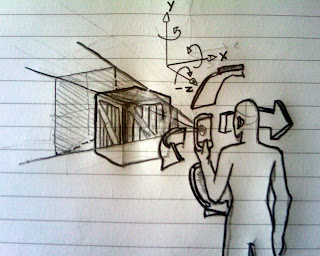
First I'll draw a crate in 3D space, then I'll set the camera (View Point) to look at it. whenever a user look away (roll/pitch/yaw) the crate, it will disappear from screen until the user point the phone back to that direction.

here's an illustration of what I mean:


code segments:

public class GLSurfaceViewActivity extends Activity implements SensorEventListener{

@Override
protected void onCreate(Bundle savedInstanceState) {
super.onCreate(savedInstanceState);
// ...
// --- init sensor ---
mSensorManager = (SensorManager)getSystemService(SENSOR_SERVICE);
sensorList = mSensorManager.getSensorList(Sensor.TYPE_ORIENTATION);
orientationSensor = sensorList.get(0);
// ...
mSensorManager.registerListener(this,
orientationSensor,SensorManager.SENSOR_DELAY_FASTEST);
}

/**
*
**/
public void onSensorChanged(SensorEvent event){
if (event.sensor == orientationSensor) {
orientationValues = event.values;
// values[0]:
// Azimuth, angle between the magnetic north direction and the Y axis,
// around the Z axis (0 to 359). 0=North, 90=East, 180=South, 270=West
float rz = event.values [0];
// values[1]:
// Pitch, rotation around X axis (-180 to 180),
// with positive values when the z-axis moves toward the y-axis.
float rx = event.values [1];
// values[2]:
// Roll, rotation around Y axis (-90 to 90),
// with positive values when the x-axis moves away from the z-axis.
float ry = -event.values [2];
// pass these sensor values into renderer ...
}
}
}

public class CrateRenderer implements GLSurfaceView.Renderer {
// ...

public void onDrawFrame(GL10 gl) {
// rotate the camera around object
gl.glRotatef(rx, 1, 0, 0);
gl.glRotatef(ry, 0, 1, 0);
gl.glRotatef(rz, 0, 0, 1);
// ...
mCube.draw(gl, textureFilter);
}
// ...
}


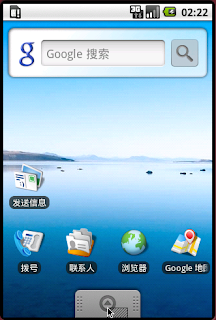
Here's some screen shots of this P.O.C.:


Regards,
Avatar Ng

Saturday, June 6, 2009

AI - 2D Path Finding ...


Hi all,

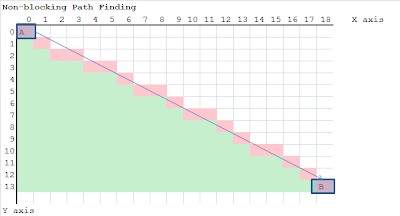
Below were some R&D on path finding, sketched some diagram on them ...

1. Non-blocking Path Finding ...

2. Blocking Path Finding

Until next time ...

Cheers,
Avatar Ng

Test Application 1

Hi all,

This 1st test application try out for following features:
- non-blocking path-finding
- point-and-click move character (touch)
- 2d graphic programming in Android

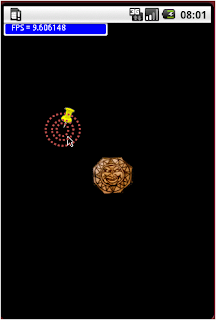
Below was some screenshot ...

Step 1 - Point at a "new" destination location


Step 2 - A new path being generated (consisting all points from travel from A to B)


Step 3 - Player object appraoching to destination location

Step 4 - After a few seconds anchor (plotting destination) vanished from screen

You will see something more in my next post ... a lot of work todo (sweat~~).

Ya, remember to check out our SVN code repository at http://code.google.com/p/hexagonm/ .


Cheers,
Avatar Ng

Friday, June 5, 2009

Project kick off ...


Things are pretty much in initialization stage, but we have moved the 1st step.

Milestone 1: testing Android API ...
Testing:
- touch, gesture
- 2D Graphic cabability
- qwerty input
- animation performance (measure by FPS)
- Threading
- Simple Path Finding (performance)

Not Tested:
- SQLite database
- OpenGL ES, 3D performance (measure by FPS, quality, supported features)
- compass feature (roll, pitch, yaw)
- Advance Path Finding, AI (performance)
- network feature
- ... etc

Had setup project on code.google.com:
- http://code.google.com/p/hexagonm/ (access with SVN based client)


Regards,
Avatar Ng